3D printing - Getting Started
How to get into the hobby of 3D printing
NB: This reflects hobbyist knowledge, not professional advice.
After receiving my first printed Chibi Mononoke figurine from a friend, I decided I wanted to be able to print figurines as well.
Imagine all the games I could play with practical minis!
Well, that was back in 2022. Since then, I acquired an Elegoo Mars 3 Pro resin printer and a Bambulab X1C filament printer, and have printed numerous items.
Behold, my printers!
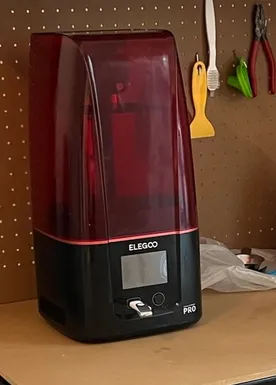
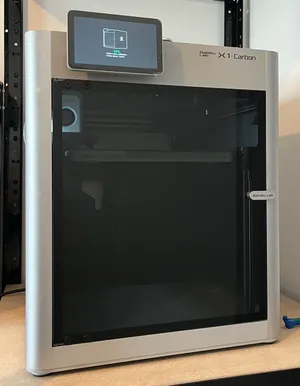
Resin printer Elegoo Mars Pro 3 and Filament printer Bambulab X1 Carbon
If you’re interested in getting into the hobby, you can do so with about 200€. Note that unless you’re starting a business, it’s unlikely to save you money by buying a printer. It’ll take time, money, and effort.
What can I do with a 3D printer?
“Why then the world’s mine oyster” - Shakespeare
You can think of it like the Minecraft of real life, there are of course limitations, but also so many possibilities:
- Hobbyist projects: Miniatures, drones, or robotics components.
- Functional household items: Tools, organizers, holders.
- Personalized gifts: Objects customized with names, patterns, or logos.
- Art and design: Sculptures, decorative items.
- Wearables: Custom-fit jewelry, costume props and accessories.
There are also more professional oriented use cases such as:
- Prototyping: Create and test product designs before manufacturing.
- Educational models: Produce models for teaching science, engineering, or medicine.
- Custom parts production: Make replacement or hard-to-find components.
- Medical aids: Print prosthetics, orthotics, or anatomical models.
- Engineering components: Gears, mechanical assemblies, or testing fixtures.
Where do I find models to print?
If you’re not a 3D designer, don’t worry, the community is large, and you’ll find plenty of models to print, both free and paid. These are the main platforms I use:
- MakerWorld - Bambu Lab’s platform, well integrated with Bambu printers and focused on ready-to-print models.
- Printables - A large community-driven platform by Prusa, with many high-quality free models.
- Cults3D - A marketplace offering both free and paid models, with many independent designers.
- MyMiniFactory - A curated platform emphasizing tested, reliable prints, with strong support for creators. This is usually where I look first to get wargame designs.
- Thingiverse - One of the oldest repositories, with a massive library of free models.
- Thangs - A model-hosting platform with its own library and support for creator subscriptions and memberships.
What printer should I get?
The 3d printing hobby is very vast and versatile, before picking a printer, you need to figure out what do you want to do with it.
I’ll give you a few examples:
- Do you wish to print detailed minis for your wargames?
- Are you a nerd who likes to spend thousands of hours tinkering with your own machine?
- Do you do 3D modelling and want to see your art come to life?
- Do you want to make big props for your costumes?
- Do you want to make practical prints for your home?
Once you have this figured out, you can ask yourself a few other questions…
- What does your place look like? Do you have a workshop dedicated to your future printer, or do you intend to place it where you sleep?
- Is that room well ventilated? Do you mind the noise?
- And last but not least, what is your budget?
In the next section I’ll go over the basics of 3D printing so you can make a more informed decision.
Resin VS Filament
There are mainly two types of 3d printing technologies available for hobbyist: filament and resin. Both use different method to turn a 3D file into a physical object, let’s see in more details how they work.
3D Technologies
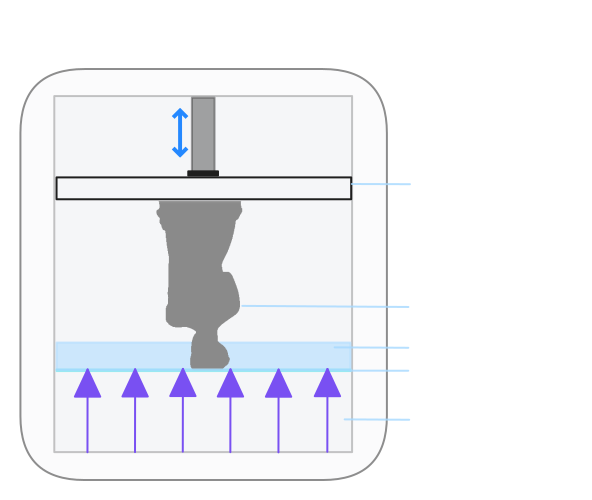
Resin
Stereolithography (SLA or SL, also known as vat photopolymerisation, optical fabrication, photo-solidification, or resin printing) is a form of 3D printing technology used for creating models, prototypes, patterns, and production parts in a layer-by-layer fashion using photochemical processes by which light causes chemical monomers and oligomers to cross-link together to form polymers. - Wikipedia
In simpler terms, resin printers make objects by shining light on liquid resin to harden it, building the object layer by layer as the platform moves.
Filament
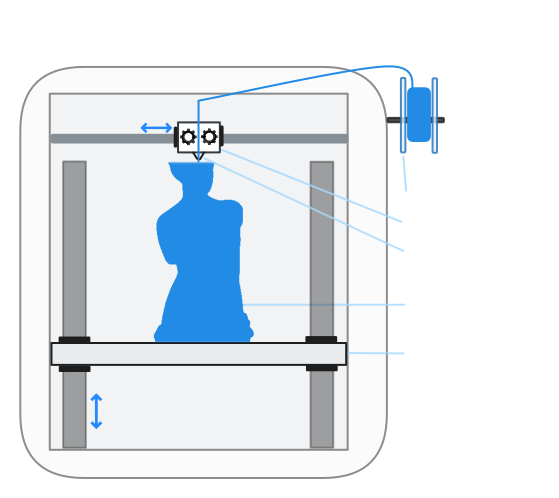
Fused filament fabrication (FFF), also known as fused deposition modeling (with the trademarked acronym FDM), or filament freeform fabrication, is a 3D printing process that uses a continuous filament of a thermoplastic material. Filament is fed from a large spool through a moving, heated printer extruder head, and is deposited on the growing work. The print head is moved under computer control to define the printed shape. - Wikipedia
In simpler terms, filament printers make objects by melting a plastic filament and pushing it through a nozzle, laying it down layer by layer as the printer’s axes move.
Ok, lots of big words, but how do you know which one is for you ?
Attributes
Resin
The main advantage of resin printers is their ability to produce very fine details and smooth surfaces, significantly exceeding what typical filament printers can achieve.
On the downside, most standard resins are more brittle than common filament materials and are more likely to crack or shatter under impact. Tough or flexible resins exist, but they increase cost and reduce some detail advantages.
Post printing process for resin is cumbersome, it requires washing in solvent and full UV curing before the part is safe to handle.
Resin printing offers a broad range of material options optimized for specific mechanical, thermal, and application-driven properties. Common resin materials can provide:
- Very high surface detail and smooth finish
- Impact resistance (tough and durable resins)
- Heat resistance and high stiffness (engineering resins)
- Flexibility or elastomeric behavior
- Biocompatibility for medical and dental use
- Clean burnout for casting applications
Filament
Filament printers are generally less precise than resin printers, but print quality has improved significantly in recent years.
Some users achieve very great detail for miniatures by using: 0.2 mm or smaller nozzles, optimized supports, models designed specifically for filament printing. Here’s an example of quality achievable compared to resin printing.
Filament printers are available in larger build sizes than resin printers, making them better suited for large parts.
Filament printing offers a broad range of material options with diverse mechanical, thermal, and environmental properties. Common filament materials can provide:
- Impact resistance
- Heat resistance
- UV resistance
- Flexibility or elasticity
- Transparency or translucency
- Phosphorescence (glow-in-the-dark additives)
Safety concerns
Resin
Resin is a toxic chemical material. Uncured and curing resin emits volatile organic compounds (VOCs) and should not be inhaled. Liquid resin is not safe to touch and commonly produces a strong odor during printing and post-processing. Direct skin contact can cause irritation and allergic sensitization, which may become permanent with repeated exposure.
When handling resin, you should wear:
- A respirator with organic vapor cartridges (P100 recommended)
- Nitrile gloves
- Safety glasses
Resin exposure can lead to permanent sensitization, filament exposure typically does not.
Because of these risks, resin printers should be used in a dedicated, well-ventilated space with active exhaust or proper filtration. Using a resin printer in living or sleeping areas is not recommended.
Filament
Filament printing is lower risk overall than resin printing, but it is not completely emission-free. Risk varies by material.
Common filaments such as PLA, PETG, and TPU emit ultrafine particles (UFPs) during printing. While generally considered low risk, printing should still be done in a ventilated room, and an enclosure further reduces exposure.
Less common filaments such as ABS, Nylon, and Polycarbonate (PC) emit both UFPs and VOCs. ABS in particular releases styrene, an irritant and possible carcinogen. Compared to resin printing, total VOC emissions are typically lower (roughly 3-6x lower), but still significant enough that:
- An enclosure with ventilation is strongly recommended
- A respirator is advisable for prolonged exposure or poorly ventilated spaces
Some filaments are reinforced with carbon fiber or glass fiber (e.g. PLA-CF, PETG-CF). These materials are marketed as stronger, but are not. Carbon fibers used in these filaments are so small that they will pierce your skin when handling them. This awesome dude goes into detail about it in this video.
Environmental concerns
Resin
Resin printing generates hazardous waste and requires careful disposal.
Uncured resin and contaminated liquids must never be poured down the drain.
Common waste produced by resin printing:
- Isopropyl alcohol (IPA) used for washing prints
- Failed prints and support material
- Paper towels and wipes contaminated with resin
- Disposable gloves
- Empty resin bottles and containers
Most resin-contaminated items should be fully UV-cured to reduce hazard before disposal, then taken to an appropriate waste collection center according to local regulations.
Filament
Filament printing mainly produces non-hazardous plastic waste, though recycling options are limited.
Most consumer filaments (PLA, PETG, ABS, etc.) are not typically accepted in standard household recycling streams due to sorting and material-mixing issues.
Common waste produced by filament printing:
- Failed prints
- Support structures
- Purge material (multi-material printing)
- Empty filament spools
To reduce impact, you can:
- Reuse or refill spools when possible
- Minimize support material
- Send sorted plastic waste to specialized filament recycling programs
A printer for your usage
Resin printers can produce very detailed miniatures, but they require dedicated space, good ventilation, and careful post-processing. If you have a well-ventilated room, no children or pets nearby, and the patience to handle cleaning and curing steps, a resin printer may be the right choice for detailed prints.
In most other cases, especially if ease of use and lower ongoing maintenance matter, a filament (FDM) printer is generally a better option.
I won’t recommend a single “best” printer, since the market changes rapidly. Instead, I’ll give you key features to look for:
Key features to look at
Resin
- Price: upfront cost of the machine.
- Build volume (print size): maximum size of parts you can print.
- Detail level (resolution): smaller XY pixels and thinner Z layers yield finer detail.
- Speed: how quickly each layer cures and how fast the overall print completes.
- Connectivity: available interfaces such as SD card, USB, Wi-Fi, or Ethernet.
- Release date: The 3D market moves fast; compare older models with the newest features.
Filament
- Price: Upfront cost of the machine.
- Build volume (print size): maximum size of parts you can print.
- Enclosure improves safety, reduces noise and particles, and enables printing of more materials.
- Supported materials: If you plan to print materials other than PLA or PETG, ensure the printer supports the required temperatures and environment.
- Speed: How fast the printer can reliably deposit material and complete a print.
- Connectivity: available interfaces such as SD card, USB, Wi-Fi, or Ethernet.
- Release date: The 3D market moves fast; compare older models with the newest features.
- Out-of-the-box experience: ease of setup, calibration, and first successful prints, especially if you do not intend to tinker.
- Automation and monitoring features: auto bed leveling, filament runout detection, failure detection, and status monitoring cameras.
Additional costs to expect
Resin
Resin printing has extra consumables and equipment beyond the printer itself:
- Cleaning station (or containers and tools for washing prints)
- UV curing system (for fully hardening prints)
- Ventilation or fume control
- Air purifier (optional, for indoor air quality)
- Resins (various types for different results)
- Isopropyl alcohol (IPA) or equivalent for cleaning
- Nitrile Gloves
- A respirator
- Transparent Glasses
- UV Glasses
Filament
There’s not so much additional cost at first, those might come when you start post-processing your prints or mixing hobbies (adding electronics, multi-material parts, paints):
- Filament spools
- Filament spools storage
- A Multi-material unit, also called MMU or AMS (Optional) - A tool to print automatically multiple colors or materials in one print
Known brands
Resin
- Elegoo
- Anycubic
- Phrozen
- Creality
- Prusa Research - On the more expensive side, they focus on reliability and open source
Filament
- Bambu Lab - They have taken over the market in the last few years with affordable printers and good software.
- Prusa Research - On the more expensive side, they focus on reliability and open source
- Creality
- Anycubic
- FlashForge
There are many more brands, but I haven’t compared them when buying mine, so I’ll keep to that list.
My current printers
Resin
I have an Elegoo Mars 3 Pro, it’s a fine printer, the quality of the prints is great, however, I really wish I had bought a printer with a bigger volume.
It doesn’t have a lot of features. I use a USB key to transfer the models I need. The lid isn’t lifting automatically, there’s no camera, nor is there failure detection.
I paid about 250€ for it, and it was totally worth it.
Filament
I have a Bambulab X1C, which I purchased for about 1200€ including the multi-material unit (AMS). It’s a great printer, and it does the job out of the box. Compared to resin printing, it felt like I had barely any work to do to successfully print something.
The connectivity uses Wi-Fi so I can send the models to print from the software and there’s a camera to watch ongoing prints.
I spent about 1500€, including the multi-material unit. I am very happy with my purchase, however, I believe I would have been content with their cheaper, less shiny version (like the P1S) which offers most of the same features at a lower price point.
I’d like to take a moment to address the questions I posed at the beginning of the article.
- Do you wish to print detailed minis for your wargames? Resin would be your go-to for now (year 2026) due to its detail level, but as we have seen above, resin is a pain to manipulate, so think twice before buying one. Also note that a filament printer is just fine for terrains, bases and anything that requires fewer details.
- Are you a nerd who likes to spend thousands of hours tinkering with your own machine? In that case, I’d recommend cheaper printers or even buying one from a second-hand marketplace. From there, you’ll be able to print/buy pieces to improve your machine. You could even go as far as printing your own 3D printer.
- Do you do 3D modelling and want to see your art come to life? If you’re creating detailed minis, once again, the resin printer is the best option. For other types of models, you should be happy with a filament printer.
- Do you want to make big props for your costumes? Bigger prints usually mean bigger printers and heavier parts. Filament printers should meet your criteria with bigger build volumes, lighter materials and stronger parts.
- Do you want to make practical prints for your home? I’ll recommend a filament printer for that one, first for the build volume and the fact that you likely won’t need as many details for practical parts. Note, however, that you’ll need post-processing if you put anything in contact with food.
With this knowledge, you should be able to choose whether you want to dive into this hobby or not, and how to find a printer. Next up is a deeper dive into both technologies.