Building a movies RAG
My goal is to learn about RAG systems by building one that finds movies from natural language prompts
Context
RAG, which stands for Retrieval-Augmented Generation, is an AI framework that combines the strengths of traditional information retrieval systems (such as search and databases) with the capabilities of generative large language models (LLMs). By combining your data and world knowledge with LLM language skills, grounded generation is more accurate, up-to-date, and relevant to your specific needs.
Source: Google Cloud
My goal with this project is to learn how to build a RAG system. I read this post from The Go Blog to better understand the concepts behind RAG and how to build one.
Dataset
The first problem we face is finding a dataset large enough for the RAG system to retrieve information from. For example, my brother built a RAG using Common Vulnerabilities and Exposures (CVE).
I chose to build one focused on movies. I found a useful dataset containing around 1 million movies based on data from The Movie Database (TMDB).
Understanding Vectors
For this project, we will need a vector database, so let’s make sure we understand the basics first.
A vector is a mathematical object that has both magnitude and direction. Vectors can be added together and multiplied by scalars (numbers). This website provides a nice visual explanation with concrete examples.
A vector database, vector store or vector search engine is a database that stores and retrieves embeddings of data in vector space. Vector databases typically implement approximate nearest neighbor algorithms so users can search for records semantically similar to a given input, unlike traditional databases which primarily look up records by exact match. Wikipedia
A vector space is a set whose elements, often called vectors, can be added together and multiplied (“scaled”) by numbers called scalars. Wikipedia
Embedding is a representation learning technique that maps complex, high-dimensional data into a lower-dimensional vector space of numerical vectors. Wikipedia
For example, two movie descriptions about space exploration may end up close together in the embedding space, even if they do not share the exact same words.
Alright, but these are just definitions. It is still hard to picture what embeddings and vector databases actually do.

Image from Google Developers: Embeddings
I recommend reading the article Embeddings by Google Developers to get a better intuition of how embedding spaces work.
Architecture
I have two main parts to build. First, I need to ingest the movie data into a vector database. Second, I need to build a way to query this data.
Ingestion Flow
Here is a high-level diagram of the ingestion flow I am aiming for:

High-level diagram of the data ingestion flow
- Raw movie data is converted into structured documents.
- The document text is transformed into embeddings using a text embedding model.
- The embeddings and associated metadata are stored in the vector database for later retrieval.
Now, here is the same ingestion flow including the technologies used in this project:

Lower level diagram of ingestion flow of the data
- Movie data is cleaned and converted into structured documents.
- The Nomic embedding model (served via Ollama) generates embeddings from each document.
- These embeddings, along with their metadata, are stored in Qdrant, where they can be queried using similarity search at runtime.
RAG (User Flow / Query Pipeline)
Here is a simple diagram of the RAG user flow I am aiming for:

High-level diagram of the RAG user flow
- The user submits a query through the interface, which forwards it to the API.
- The API converts the query into an embedding, retrieves similar documents from the vector database, and prepares the context.
- The LLM generates an answer using the retrieved context, and the response is returned to the user.
Here is the same RAG user flow including the technologies used in this project:

Lower-level diagram of the RAG user flow
- The user interacts with the Chainlit interface, which sends the request to FastAPI.
- FastAPI uses the Nomic embedding model, served through Ollama, to embed the query and performs a similarity search in Qdrant using cosine distance.
- The retrieved documents are passed to Llama 3.1, served through Ollama, which generates the final response returned through FastAPI to the interface.
Setup
I run my applications on a Mac M3 with 18 GB of RAM and an 11-core CPU.
Python stack
I chose Python for this project because I wanted to try some of the newer tools in the ecosystem.
I picked:
- uv as the package manager
- Ruff as the linter and formatter
- ty as the type checker
- FastAPI as the API framework
- uvicorn as the web server
AI stack
The tools used for the AI part are:
- Ollama to run LLMs locally on my machine
- Qdrant as the vector database
- Nomic (
nomic-embed-textthrough Ollama) as the text embedding model - Llama (
llama3.1:8bthrough Ollama) as the LLM - Chainlit as an open-source Python framework for building conversational AI applications
Docker
If you check the repository, you will see that I Dockerized everything from the start to have a portable environment.
This is a personal preference and is probably overkill for this project. A Python virtual environment with the required tools installed locally would work perfectly fine.
Ingestion
I’ll walk through the steps I took to ingest the data into the vector database.
Step 0: Install the tools
We don’t need the full stack installed yet, so let’s iterate step by step.
The first tools we need are:
We also need to download the embedding model from Nomic:
ollama pull nomic-embed-textAnd a few Python libraries:
- kagglehub - interact with Kaggle resources
- ollama - communicate with the Ollama API from Python.
- pandas - data analysis and manipulation library
- qdrant-client - Python client library for Qdrant
- requests - HTTP client library
Installing these libraries with uv is trivial:
uv add kagglehub ollama pandas qdrant-client requestsStep 1: Get the dataset
The chosen dataset is a large CSV file, so we will use pandas later to read and process it.
We download the dataset using the kagglehub Python library.
import shutil
import kagglehub
from pathlib import Path


def downloadDataset():
    raw_path = kagglehub.dataset_download(
        "asaniczka/tmdb-movies-dataset-2023-930k-movies"
    )

    target_dir = Path("/app/data/tmdb")

    target_dir.mkdir(parents=True, exist_ok=True)

    for item in Path(raw_path).rglob("*"):
        if item.is_file():
            dest = target_dir / item.name
            shutil.copy2(item, dest)

    print("[DATASET] stored at:", target_dir)

    return str(target_dir)


if __name__ == "__main__":
    downloadDataset()
Github file: scripts/download_dataset.py
Step 2: Explore the dataset
Before ingesting the data, we need to understand the structure of the CSV file and decide which fields will be useful for our documents.
First, let’s create a function to load the dataset.
import pandas as pd
from src.config import DATASET_PATH


def load_movies():
    if not DATASET_PATH.exists():
        raise FileNotFoundError(f"Dataset not found at {DATASET_PATH}")

    df = pd.read_csv(DATASET_PATH)

    return df
Github file: src/dataset/loader.py
Let’s inspect the dataset using pandas:
from src.dataset.loader import load_movies
from src.dataset.documentBuilder import movieToDocument


if __name__ == "__main__":
    try:
        df = load_movies().fillna("")

        print(df.columns)  # The titles
        print(df.head())  # The first 5 rows
        movie = df.iloc[0]

        for column in df.columns:
            print(f"{column}: {movie[column]}")  # The first movie's columns

    except Exception as err:
        print(f"err {err}")
Github file: cmd/exploreDataset.py
Result
Index(['id', 'title', 'vote_average', 'vote_count', 'status', 'release_date',
       'revenue', 'runtime', 'adult', 'backdrop_path', 'budget', 'homepage',
       'imdb_id', 'original_language', 'original_title', 'overview',
       'popularity', 'poster_path', 'tagline', 'genres',
       'production_companies', 'production_countries', 'spoken_languages',
       'keywords'],
      dtype='str')

       id  ...                                           keywords
0   27205  ...  rescue, mission, dream, airplane, paris, franc...
1  157336  ...  rescue, future, spacecraft, race against time,...
2     155  ...  joker, sadism, chaos, secret identity, crime f...
3   19995  ...  future, society, culture clash, space travel, ...
4   24428  ...  new york city, superhero, shield, based on com...

[5 rows x 24 columns]
id: 27205
title: Inception
vote_average: 8.364
vote_count: 34495
status: Released
release_date: 2010-07-15
revenue: 825532764
runtime: 148
adult: False
backdrop_path: /8ZTVqvKDQ8emSGUEMjsS4yHAwrp.jpg
budget: 160000000
homepage: https://www.warnerbros.com/movies/inception
imdb_id: tt1375666
original_language: en
original_title: Inception
overview: Cobb, a skilled thief who commits corporate espionage by infiltrating the subconscious of his targets is offered a chance to regain his old life as payment for a task considered to be impossible: "inception", the implantation of another person's idea into a target's subconscious.
popularity: 83.952
poster_path: /oYuLEt3zVCKq57qu2F8dT7NIa6f.jpg
tagline: Your mind is the scene of the crime.
genres: Action, Science Fiction, Adventure
production_companies: Legendary Pictures, Syncopy, Warner Bros. Pictures
production_countries: United Kingdom, United States of America
spoken_languages: English, French, Japanese, Swahili
keywords: rescue, mission, dream, airplane, paris, france, virtual reality, kidnapping, philosophy, spy, allegory, manipulation, car crash, heist, memory, architecture, los angeles, california, dream world, subconscious
Step 3: Initalize the database
We create a Qdrant client, connect to the Qdrant instance, and create a collection called movies.
In the model’s documentation, we can see that nomic-bert.embedding_length=768.
This means each embedding generated by the model contains 768 dimensions, so the Qdrant collection needs to be configured with the same vector size.
Qdrant is a vector database that performs nearest-neighbor search. We use cosine distance to measure the similarity between vectors.
from qdrant_client import QdrantClient
from qdrant_client.models import VectorParams, Distance

client = QdrantClient(url="http://qdrant:6333")


def createCollection(vector_size: int = 768):
    client.recreate_collection(
        collection_name="movies",
        vectors_config=VectorParams(
            size=vector_size,
            distance=Distance.COSINE,
        ),
    )

    print("[QDRANT] collection 'movies' ready")

if __name__ == "__main__":
    createCollection(vector_size=768)
Github file: src/vectordb/qdrantClient.py
Step 4: Ingestion
Before creating the ingestion pipeline, we need a way to convert text into embeddings.
For this, we send the movie text to the nomic-embed-text embedding model through Ollama.
import requests

OLLAMA_URL = "http://ollama:11434"


def embedText(text: str) -> list[float]:
    response = requests.post(
        f"{OLLAMA_URL}/api/embeddings",
        json={
            "model": "nomic-embed-text",
            "prompt": text,
        },
        timeout=30,
    )
    response.raise_for_status()
    return response.json()["embedding"]
Github file: src/embeddings/httpEmbedding.py
Understanding embeddings
An embedding is a list of numbers that represents a piece of data in a vector space.
For text, embedding models transform sentences into vectors where similar concepts tend to be located closer together. This allows computers to compare text based on semantic similarity rather than only exact word matches.
import numpy as np
from numpy.typing import NDArray


Embedding = NDArray[np.float64]


def cosine_similarity(a: Embedding, b: Embedding) -> float:
    return float(
        np.dot(a, b) /
        (np.linalg.norm(a) * np.linalg.norm(b))
    )


def compare_texts(text_a: str, text_b: str) -> float:
    embedding_a = np.array(embedText(text_a), dtype=np.float64)
    embedding_b = np.array(embedText(text_b), dtype=np.float64)

    return cosine_similarity(embedding_a, embedding_b)


def main() -> None:
    base_sentence: str = "Prince, Princess"
    sentence_comparison1: str = "A fairy tale about royalty and a king and queen"
    similarity = compare_texts(base_sentence, sentence_comparison1)
    print(f"{base_sentence} <-- vs -> {sentence_comparison1}")
    print(f"Similarity: {round(similarity, 2)}\n")

    sentence_comparison2: str = "A car engine repair manual with mechanical instructions"
    similarity = compare_texts(
        base_sentence,
        sentence_comparison2
    )
    print(f"{base_sentence} <-- vs --> {sentence_comparison2}")
    print(f"Similarity: {round(similarity, 2)}")


if __name__ == "__main__":
    main()
Result:
Prince, Princess <-- vs -> A fairy tale about royalty and a king and queen
Similarity: 0.73

Prince, Princess <-- vs --> A car engine repair manual with mechanical instructions
Similarity: 0.42
Next, we ingest a few movies into Qdrant. We do not need to test the project with a database containing 1 million entries yet, so 200 movies is enough for now.
Each movie becomes a Qdrant point. The vector contains the embedding, while the payload contains metadata associated with the movie.
from src.dataset.loader import load_movies
from src.embeddings.httpEmbedding import embedText
from src.vectordb.qdrantClient import client


def ingest(n=200):
    df = load_movies().fillna("")
    df = df.head(n)

    for i, row in df.iterrows():
        text = f"{row['title']} {row['overview']} {row['tagline']}"
        vector = embedText(text)

        client.upsert(
            collection_name="movies",
            points=[
                {
                    "id": int(row["id"]),
                    "vector": vector,
                    "payload": {
                        "title": row["title"],
                        "overview": row["overview"],
                        "genres": row["genres"],
                    },
                }
            ],
        )

        if i % 50 == 0:
            print("ingested:", i)


if __name__ == "__main__":
    ingest()
Github file: cmd/ingest.py
Step 5: Search database
Now that we have stored data in the vector database, we can query it.
The top_k parameter determines how many results Qdrant should return. These results are ranked by vector similarity.
from qdrant_client import QdrantClient
from qdrant_client.models import SearchRequest
from src.embeddings.httpEmbedding import embedText

client = QdrantClient(url="http://qdrant:6333")


def search_movies(query: str, top_k: int = 5):
    query_vector = embedText(query)

    results = client.query_points(
        collection_name="movies",
        query=query_vector,
        limit=top_k,
        with_payload=True,
    )

    for r in results.points:
        print("\n---")
        print("title:", r.payload["title"])
        print("genres:", r.payload["genres"])
        print("overview:", r.payload["overview"][:200])


if __name__ == "__main__":
    search_movies("dream infiltration mind heist")
Github file: cmd/qdrantSearch.py
Result
---
title: Inception
genres: Action, Science Fiction, Adventure
overview: Cobb, a skilled thief who commits corporate espionage by infiltrating the subconscious of his targets is offered a chance to regain his old life as payment for a task considered to be impossible: "inc

---
title: Fear in the Night
genres: Crime, Drama, Mystery, Thriller
overview: The dream is unusually vivid: Bank employee Vince Grayson finds himself murdering a man in a sinister octagonal-shaped room lined with mirrors while a mysterious woman breaks into a safe. It is so viv

---
title: The Master Touch
genres: Thriller, Action, Crime
overview: A master thief, just out of prison, concocts a risky final score that would net him over a million dollars.

---
title: Trance
genres: Thriller, Crime, Drama, Mystery
overview: A violent gang enlists the help of a hypnotherapist in an attempt to locate a painting which somehow vanished in the middle of a heist.

---
title: In Dreams
genres: Mystery, Thriller, Horror
overview: A suburban housewife learns that she has psychic connections to a serial killer, and can predict this person's motives through her dreams.
Step 6: Qdrant client
On this url http://localhost:6333/dashboard you may access Qdrant’s dashboard.
It allows you to visualize and query your vector database, inspect collections, and explore stored points.
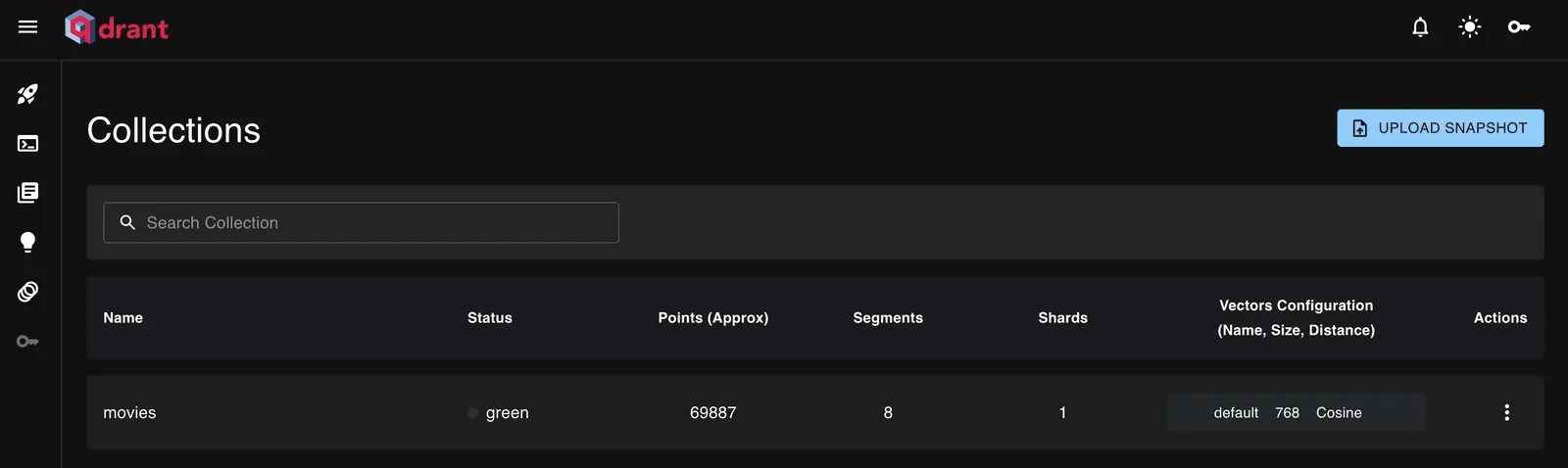
Qdrant collections
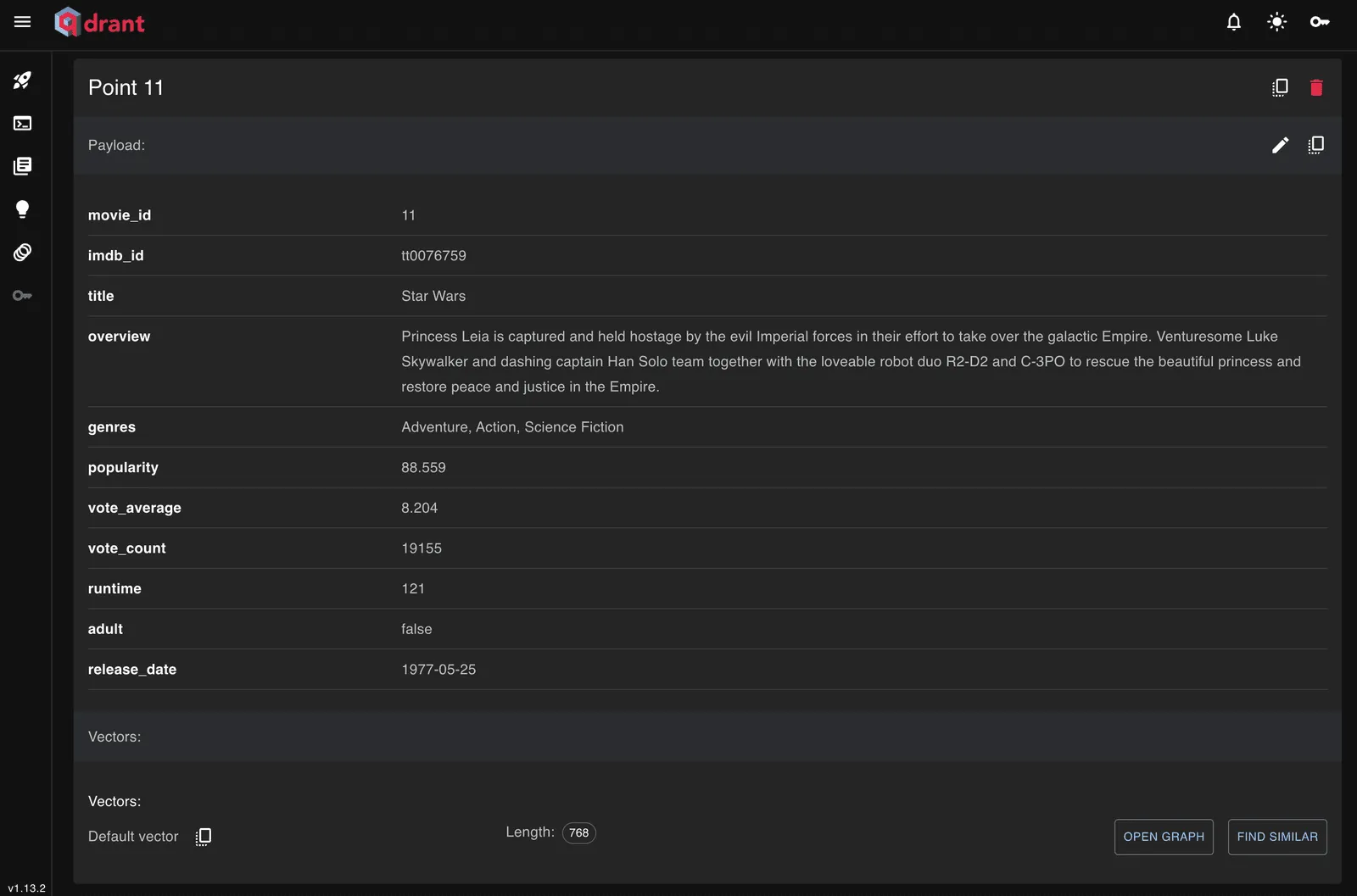
Qdrant point example
The Qdrant API provides query operations, such as listing collections:
// List all collections
GET collections
Which returns:
{
  "result": {
    "collections": [
      {
        "name": "movies"
      }
    ]
  },
  "status": "ok",
  "time": 0.000262373
}
You can also retrieve points using filters:
POST collections/movies/points/scroll
{
  "limit": 10,
  "filter": {
    "must": [
      {
        "key": "title",
        "match": {
          "any": [
            "Star Wars"
          ]
        }
      }
    ]
  }
}
This returns points matching the filter:
{
  "result": {
    "points": [
      {
        "id": 11,
        "payload": {
          "movie_id": 11,
          "imdb_id": "tt0076759",
          "title": "Star Wars",
          "overview": "Princess Leia is captured and held hostage by the evil Imperial forces in their effort to take over the galactic Empire. Venturesome Luke Skywalker and dashing captain Han Solo team together with the loveable robot duo R2-D2 and C-3PO to rescue the beautiful princess and restore peace and justice in the Empire.",
          "genres": "Adventure, Action, Science Fiction",
          "popularity": 88.559,
          "vote_average": 8.204,
          "vote_count": 19155,
          "runtime": 121,
          "adult": false,
          "release_date": "1977-05-25"
        }
      }
    ],
    "next_page_offset": null
  },
  "status": "ok",
  "time": 0.024117376
}
RAG
We now have a vector database containing a few movie points. Let’s build the Retrieval-Augmented Generation part.
Step 0: Install the tools
The last tool we need is Chainlit, which will provide the chat interface for interacting with our RAG.
We also need to download the LLM:
ollama pull llama3.1:8bAnd a few more Python libraries:
- uvicorn - ASGI web server implementation for Python
- chainlit - framework for building conversational AI interfaces
- fastapi - web framework for building APIs
We’re installing them with uv:
uv add uvicorn chainlit fastapiStep 1: Chainlit
We’ll use Chainlit only as the user interface layer. It receives messages from the user and forwards the queries to the FastAPI backend that we will create next.
@cl.on_message is a Chainlit event handler that runs every time the user sends a message.
import chainlit as cl
import requests

API_URL = "http://app:8000/ask"


@cl.on_message
async def main(message: cl.Message):
    response = requests.post(
        API_URL,
        json={"question": message.content},
        timeout=120,
    )

    if response.status_code != 200:
        await cl.Message(content="Error calling API").send()
        return

    answer = response.json()["answer"]

    await cl.Message(content=answer).send()
Step 2: Building our app’s API
We need a FastAPI backend that responds to the /ask route when we send a message from Chainlit.
When we receive a message, we want to:
- Convert the user’s text into an embedding.
- Search Qdrant for similar movie points.
- Build a context from the retrieved movies.
- Send this context to the LLM and ask it to generate an answer.
This is the main RAG pipeline: retrieval + generation.
from fastapi import FastAPI
from pydantic import BaseModel

from src.embeddings.httpEmbedding import embedText
from qdrant_client import QdrantClient
import requests

app = FastAPI()

qdrant = QdrantClient(url="http://qdrant:6333")
OLLAMA_URL = "http://ollama:11434"


class AskRequest(BaseModel):
    question: str


def search_qdrant(vector: list[float], top_k=5):
    results = qdrant.query_points(
        collection_name="movies",
        query=vector,
        limit=top_k,
        with_payload=True,
    )
    return results.points


def build_context(points):
    context = []
    for p in points:
        payload = p.payload
        context.append(
            f"{payload.get('title')}: {payload.get('overview')}"
        )
    return "\n\n".join(context)


def generate_answer(question, context):
    prompt = f"""
You are a movie recommendation system.

Use ONLY the context below.

Context:
{context}

User question:
{question}

Answer:
"""

    response = requests.post(
        f"{OLLAMA_URL}/api/generate",
        json={
            "model": "llama3.1:8b",
            "prompt": prompt,
            "stream": False,
        },
    )

    response.raise_for_status()
    return response.json()["response"]


@app.post("/ask")
def ask(req: AskRequest):
    vector = embedText(req.question)
    matches = search_qdrant(vector)
    context = build_context(matches)
    answer = generate_answer(req.question, context)

    return {
        "question": req.question,
        "answer": answer,
    }
The app is run with the following command:
uvicorn src.api.client:app --host 0.0.0.0 --port 8000 --reloadStep 3: Using our RAG
We now have a functional RAG application and can start asking questions about movies.
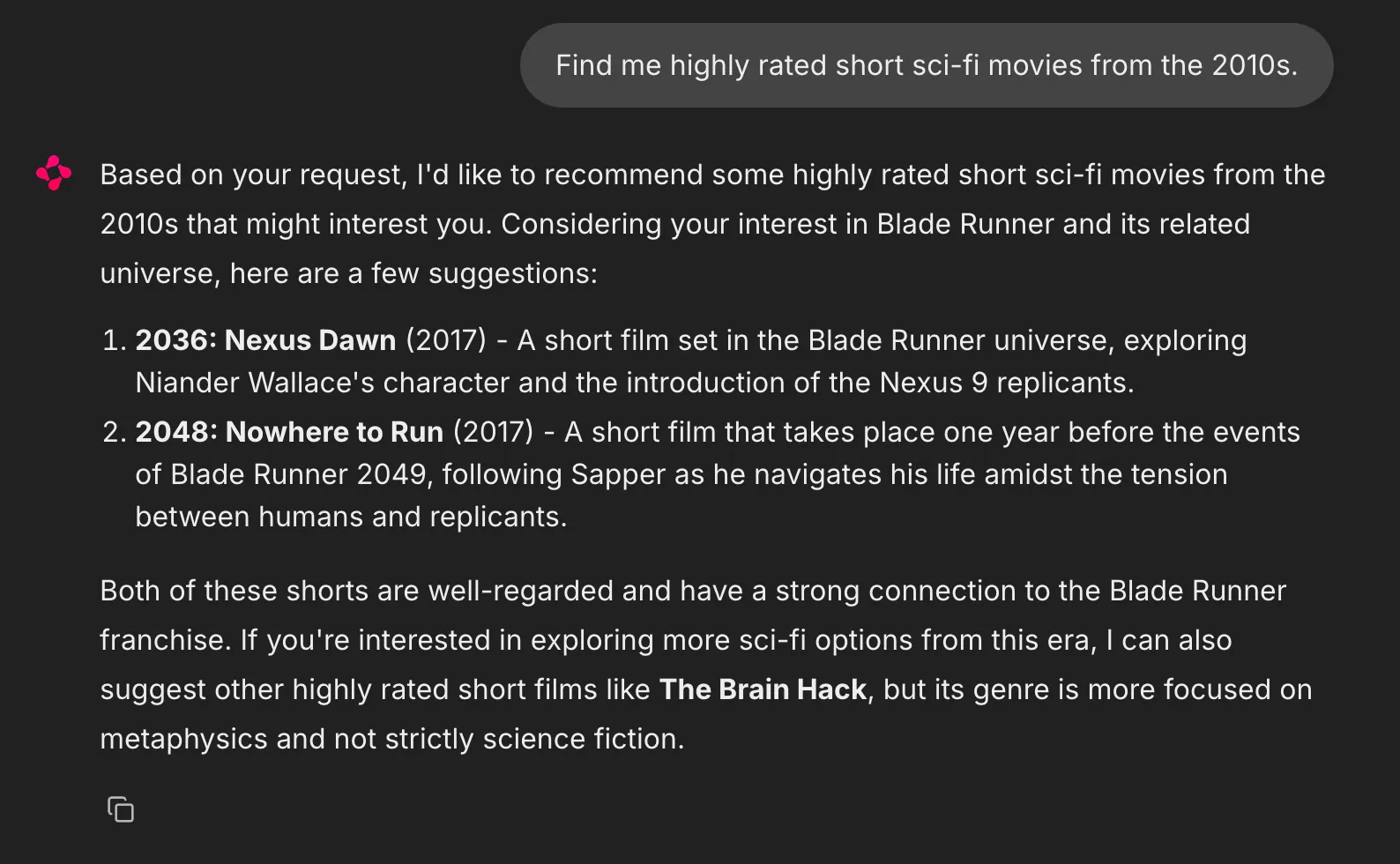
I verified in the database that the returned movies are stored in Qdrant, have a rating above 6.5/10, and were released between 2010 and 2020.
What next
I cleaned up the code, added a linter (Ruff), a type checker (ty), some tests, a GitHub pipeline, and tidied up my Makefile, Docker, and Compose setup. Here is the repository at the moment.
At this point, we have a working RAG system, but there is still a lot we could improve.
1. Ingestion
Qdrant currently contains 200 movies, but the full dataset contains around 1 million entries.
I tried ingesting more data, but I ran into a performance issue: ingestion is very slow. I ingested around 40k points in an hour, which means the full dataset would take roughly 25 hours.
During ingestion, my machine is running at full capacity. There are a few things I could try:
- Sending batches of movies instead of one movie at a time
- Checking whether running Ollama outside Docker improves performance
- Using a more powerful machine or a remote server for the embedding process
2. Chat memory
The LLM currently has no awareness of previous conversations.
A possible improvement would be to send Chainlit’s chat_context to the /ask route, allowing the model to use previous messages when answering follow-up questions.
3. Reranking
Currently, we retrieve 5 points from Qdrant. A possible improvement would be to retrieve more candidates (for example 20) and rerank them before sending the final context to the LLM.
The closest embedding is not always the most relevant movie.
A reranker model (for example a cross-encoder) could compare the user query with each retrieved movie and select the best matches.
4. Hybrid search
We could combine semantic search with lexical search.
Semantic search understands concepts. For example:
“Give me a movie like Avatar”
A vector search can understand: Avatar → blue aliens → another planet → nature → science fiction
However, lexical search can directly match the word Avatar
For instance “Give me a movie like Avatar”. Vector search understands “Avatar -> blue aliens -> planet -> nature -> sci-fi”. While exact keyword will match “Avatar” directly.
This is useful when users mention exact movie titles, actors, or keywords. Qdrant supports sparse vectors, which could be combined with dense vectors to create a hybrid search system.
5. Validation
My current prompt says:
“Use ONLY the context below”
but this is only a soft instruction. The LLM could still hallucinate a movie that does not exist in the database.
A possible improvement would be to include movie IDs in the retrieved context and validate the generated answer against the database.
Another option would be to use a second LLM as a validator, but that feels unnecessary for this project (and would increase the hardware requirements).
6. Evals
We could add evaluations with a tool such as Ragas to measure RAG quality.
The test data could look like:
[
 {
  "question": "movie about space survival",
  "expected": [
    "Interstellar",
    "The Martian"
  ]
 },
 {
  "question": "sad romance movies",
  "expected": [
    "Titanic"
  ]
 }
]
This would allow us to measure whether changes improve or degrade the system.
7. More ideas
Other possible improvements:
- Use an LLM for query rewriting so the user’s question is transformed into a better search query
- Create a user profile to personalize recommendations based on preferences
- Use metadata filters for structured data such as dates, ratings, runtime, and popularity
- Add a recommendation score combining semantic similarity with movie metadata