Getting Started with Filament Printing - Basics
How to get into the hobby of 3D filament printing
Getting Started with Resin Printing
In Getting Started with 3D Printing we’ve covered the basics of 3D printing: how filament printing works, the advantages and disadvantages, the safety considerations and how to pick a printer.
Let’s go deeper into these subjects and focus on how to print with a filament printer.
General Knowledge before printing
Safety
I might repeat myself here but, as we say, safety first.
Filament printing is generally lower risk than resin printing, but it is not emission-free. During printing, heated thermoplastics release airborne particles and gases. The type and quantity depend on:
- the filament material
- additives and colorants
- nozzle temperature
- printer enclosure and ventilation
- print duration
Ultrafine particles (UFPs)
Most filament printers emit large quantities of Ultrafine Particles (UFPs), typically defined as particles smaller than 100 nm.
Studies measuring desktop FDM printers have reported emissions ranging from millions to billions of particles per minute depending on material and settings.
Common filaments such as PLA, PETG, and TPU primarily emit UFPs, with generally lower VOC emissions than engineering materials. However, they should not be considered harmless.
Because UFPs are extremely small, they can remain airborne for long periods and penetrate deep into the respiratory tract.
Volatile Organic Compounds (VOCs)
Some filaments emit significant amounts of Volatile Organic Compounds (VOCs) during printing.
Materials commonly associated with higher VOC emissions include: ABS, ASA, Nylon, HIPS, Polycarbonate blends
ABS is particularly well studied because it releases styrene during printing. Styrene is classified by the International Agency for Research on Cancer (IARC) as “probably carcinogenic to humans” (Group 2A).
VOC and particle emissions are generally higher for ABS than for PLA under comparable conditions.
Higher nozzle temperatures typically increase emissions.
Carbon fiber and glass fiber reinforced filaments
Filaments reinforced with chopped carbon fiber or glass fiber (PLA-CF, PETG-CF, Nylon-CF, etc.) are used to improve stiffness and dimensional stability.
However, these materials also:
- increase nozzle wear
- generate abrasive dust when sanding or machining prints
- may irritate skin, eyes, or lungs when handling dust
These filaments use short chopped fibers, not continuous fibers. They are not equivalent to asbestos, but dust exposure should still be minimized.
When sanding reinforced prints:
- wear respiratory protection
- avoid enclosed unventilated spaces
- clean dust using wet wiping or a HEPA vacuum rather than compressed air
Practical recommendations
For hobbyist printing:
- Print in a ventilated room
- Prefer enclosed printers or add an enclosure
- Avoid prolonged exposure in small unventilated rooms
- Use HEPA + activated carbon filtration as a supplementary measure to reduce particles and odors
Respiratory protection is advisable when:
- printing high-emission materials frequently
- operating multiple printers
- sanding printed parts
- working in poorly ventilated spaces
Unlike resin printing, handling fully printed filament parts is generally considered low risk.
Sources
This hobby remains relatively recent in widespread home use, and scientific research is still limited, with varying experimental conditions across studies. Much of the practical information available also comes from hobbyist testing and YouTube sources, which can be useful but are not always controlled or reproducible. Peer-reviewed studies provide the most reliable scientific baseline for understanding particle and VOC emissions, although real-world conditions may differ from laboratory setups.
- Ultrafine particle emissions from desktop 3D printers (2013)
- Emissions of ultrafine particles and VOCs from commercially available desktop 3D printers (2016)
- Particle and volatile organic compound emissions from a 3D printer filament extruder (2020)
- Parameters Influencing the Emission of Ultrafine Particles during 3D Printing (2021)
- Exposure hazards of particles and volatile organic compounds emitted from material extrusion 3D printing (2023)
Environment and Waste Disposal
Filament printing produces mainly plastic waste, which is generally not handled by standard household recycling systems.
Most consumer filaments (PLA, PETG, ABS, etc.) are rarely accepted in municipal recycling streams due to sorting limitations, mixed material properties, and additives or pigments that complicate recycling.
Some materials are technically biodegradable under industrial conditions (such as PLA), but this does not occur in typical home composting or landfill environments.
Common waste produced by filament printing:
- Failed prints
- Support structures
- Purge material (multi-material printing)
- Empty filament spools (often not recyclable depending on design and material)
To reduce environmental impact, you can:
- Think before you print: do you actually need this object?
- Prefer models designed for fewer supports or optimized orientation
- Reuse or refill spools when possible
- Choose refill systems or cardboard spools when compatible with your setup
- Optimize orientation and slicer settings to reduce supports and waste
- Use draft prints or lower quality settings for test iterations
- Use specialized filament recycling programs where available
- Avoid unnecessary multi-color prints
Recycling programms
There are a few programs that accept and recycle filament waste, but they typically require careful sorting by material type.
Well-known examples include:
- Recycling Fabrik in Germany
- Printerior in the USA. Local makerspaces or fablabs may also offer collection or recycling initiatives.
CNC Kitchen has a detailed video demonstrating filament recycling workflows. The general conclusion is that, for most hobby users, the time, cost, and complexity often outweigh the environmental benefit at small scale.
Alternative approaches such as melting plastic into molds exist, but are generally labor-intensive and not widely practical for typical hobby use.
Multi color prints
Multi-color printing give you a cool result without minimal effort but also increases print time and material waste.
On systems with single-nozzle multi-material setups, color changes require purging previous material before printing the next color. This can result in significant waste relative to the final part, depending on the model and settings.
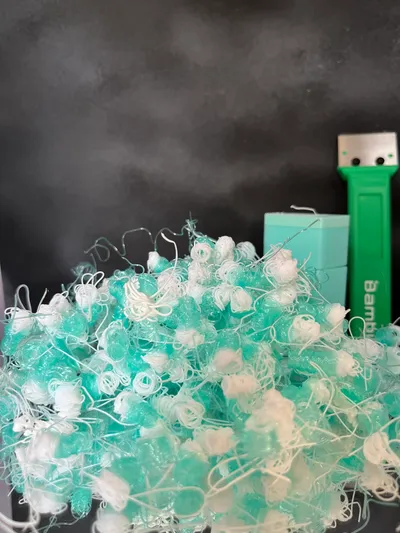
I learned the hard way
Newer printer systems using multiple nozzles or toolheads can reduce purge waste, but are still relatively uncommon in consumer setups (2026).
Some slicers and tools, such as Hueforge, allow color variation through layer-based or gradient techniques, reducing the need for frequent filament swaps. Here are some example results
In general, designs optimized for fewer color changes produce less waste, look for “No AMS” in the design’s title.
An alternative approach is to print single-color parts and paint them.
Choosing your filament
Choosing a filament can feel overwhelming at first.
There are dozens of materials, blends, additives, and marketing terms, but most beginners only need to understand a few common filament types.
Bambu Lab’s filament guide is a good overview when you want a quick understanding of a material, its properties, and its printing requirements.
The most common filament materials you will encounter are:
- PLA - easy to print, low warping, ideal for decorative parts and general prototypes
- PETG - stronger and more heat resistant than PLA, commonly used for functional parts
- ABS - durable and heat resistant, but more difficult to print and usually requires an enclosure
- TPU - flexible material used for soft, rubber-like parts
As a beginner, you will most likely start with:
- PLA is the easiest starting point and works for most basic prints
- PETG is a step up in strength and temperature resistance when PLA is not enough
You will also quickly encounter variations of these materials such as:
- PLA+ / PLA Pro - modified PLA blends, often marketed as stronger or less brittle
- PLA Matte - designed for a less glossy finish and reduced visible layer lines
- PLA-CF / PETG-CF - carbon fiber reinforced blends with increased stiffness and a different surface finish
- Silk, transparent, glow-in-the-dark, wood-filled, or metal-filled variants
These variants can change:
- print difficulty
- surface finish
- stiffness or flexibility
- nozzle wear
- moisture sensitivity
Many specialty filaments print differently from their base material despite sharing the same name.
For most beginners, standard PLA is usually the easiest and safest starting point.
Personally, I mainly use PLA Matte for decorative prints because I prefer its surface finish when painting models. The matte texture tends to hide layer lines and reflections better than glossy PLA, and I have generally found primer coverage easier and more uniform on matte prints.